
Using Azure Key Vault in Microsoft Fabric Notebooks
Learn how to securely manage secrets in Microsoft Fabric Notebooks using Azure Key Vault.
Securing Secrets in Microsoft Fabric Notebooks with Azure Key Vault
Microsoft Fabric notebooks provide a powerful environment for data analysis and machine learning, but handling secrets securely can be challenging. This article explores how to leverage Azure Key Vault to manage secrets in Microsoft Fabric notebooks effectively.
In this article, I will walk through the process of creating and using secrets in Azure Key Vault within Microsoft Fabric notebooks. This approach ensures sensitive information remains protected and adheres to best practices for security management.
We will cover the following key steps:
- Creating an Azure Key Vault service.
- Assigning appropriate roles to users or service principals for creating and reading secrets.
- Accessing secrets in Microsoft Fabric notebooks using the
mssparkutils.credentials.getSecretmethod.
1. Setting Up Azure Key Vault
Creating an Azure Key Vault Service
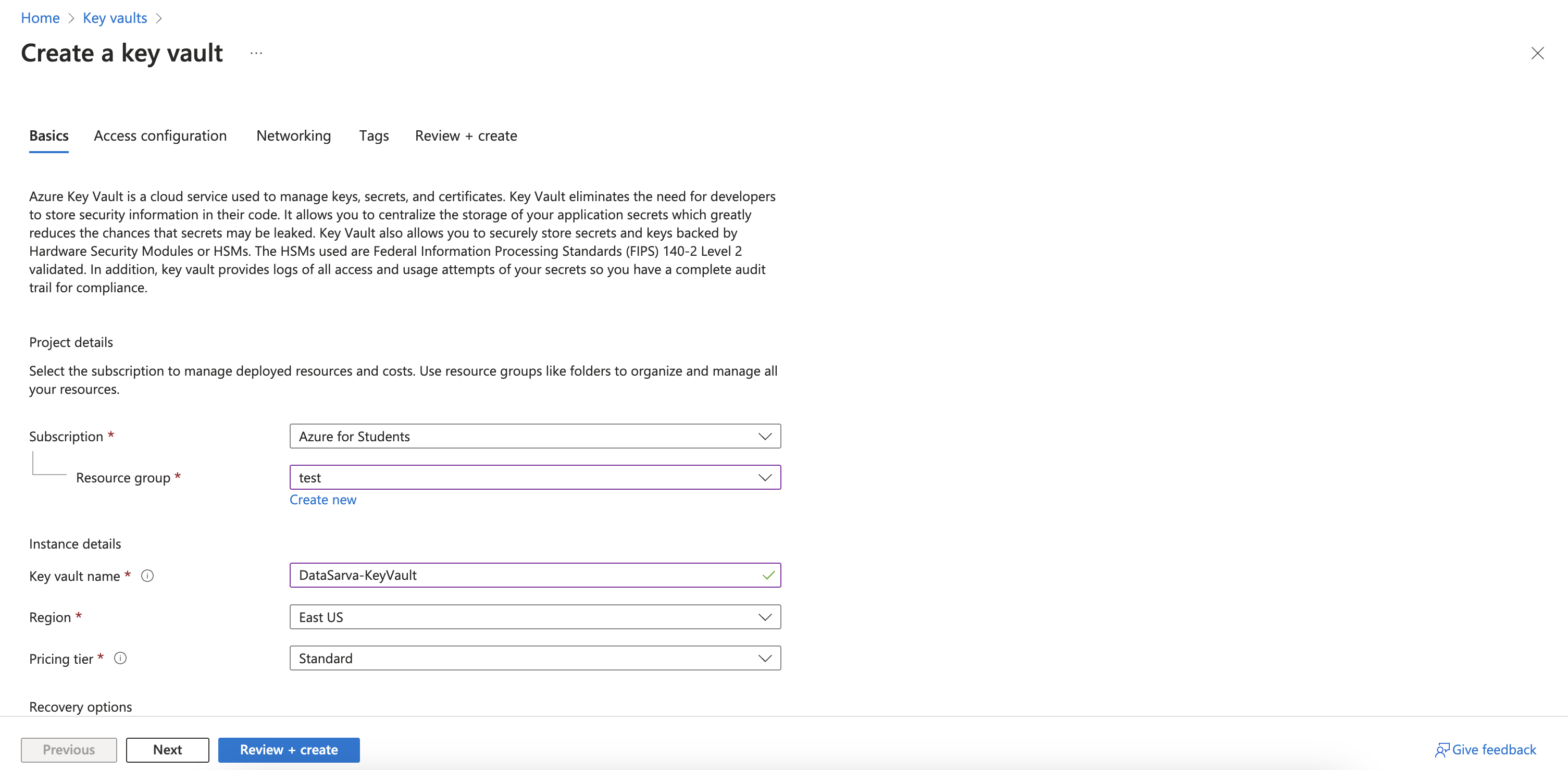
To begin, you'll need to create an Azure Key Vault service. This secure, cloud-based container will store your secrets, keys, and certificates.
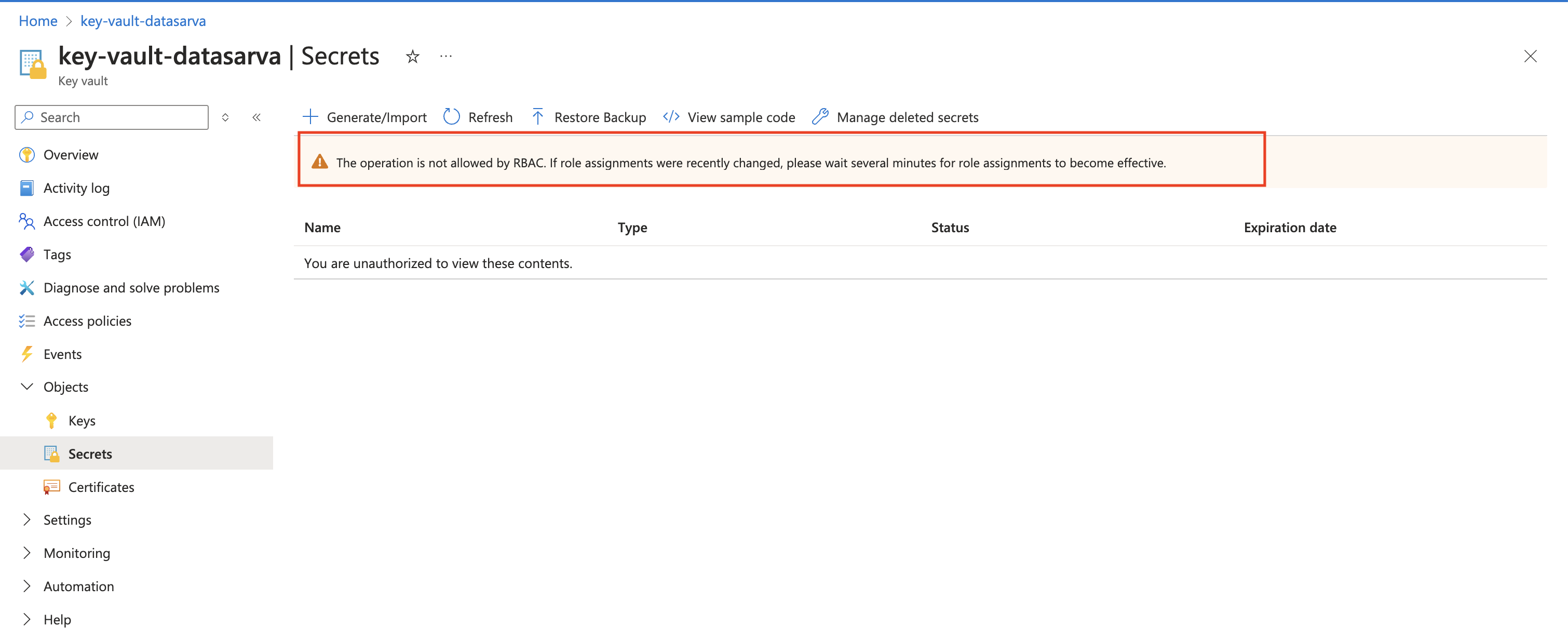
When accessing Azure Key Vault, the error "The operation is not allowed by RBAC" indicates insufficient permissions. Ensure you're assigned the appropriate role (e.g., Key Vault Contributor) and wait a few minutes for new role assignments to take effect.
Understanding Role-Based Access Control (RBAC)
Azure Key Vault uses role-based access control to manage permissions. Two key roles are essential for our use case:
- Key Vault Contributor: This role allows creating and managing secrets in the Key Vault.
- Key Vault Secrets User: This role permits reading secrets from the Key Vault.
These roles can be assigned to either a user or a service principal, here we are trying to use the principle of least privilege, providing flexibility in your security setup.
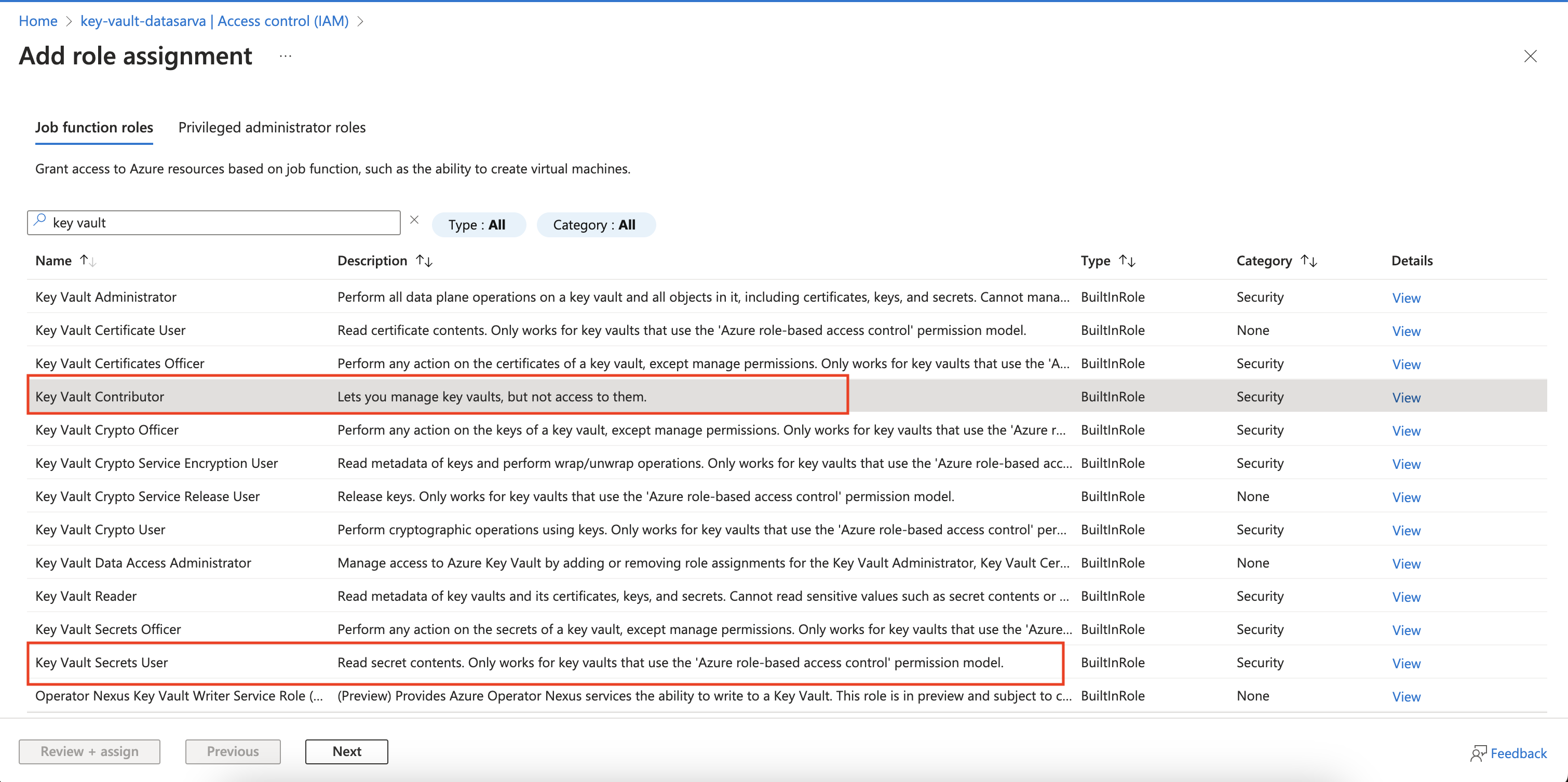
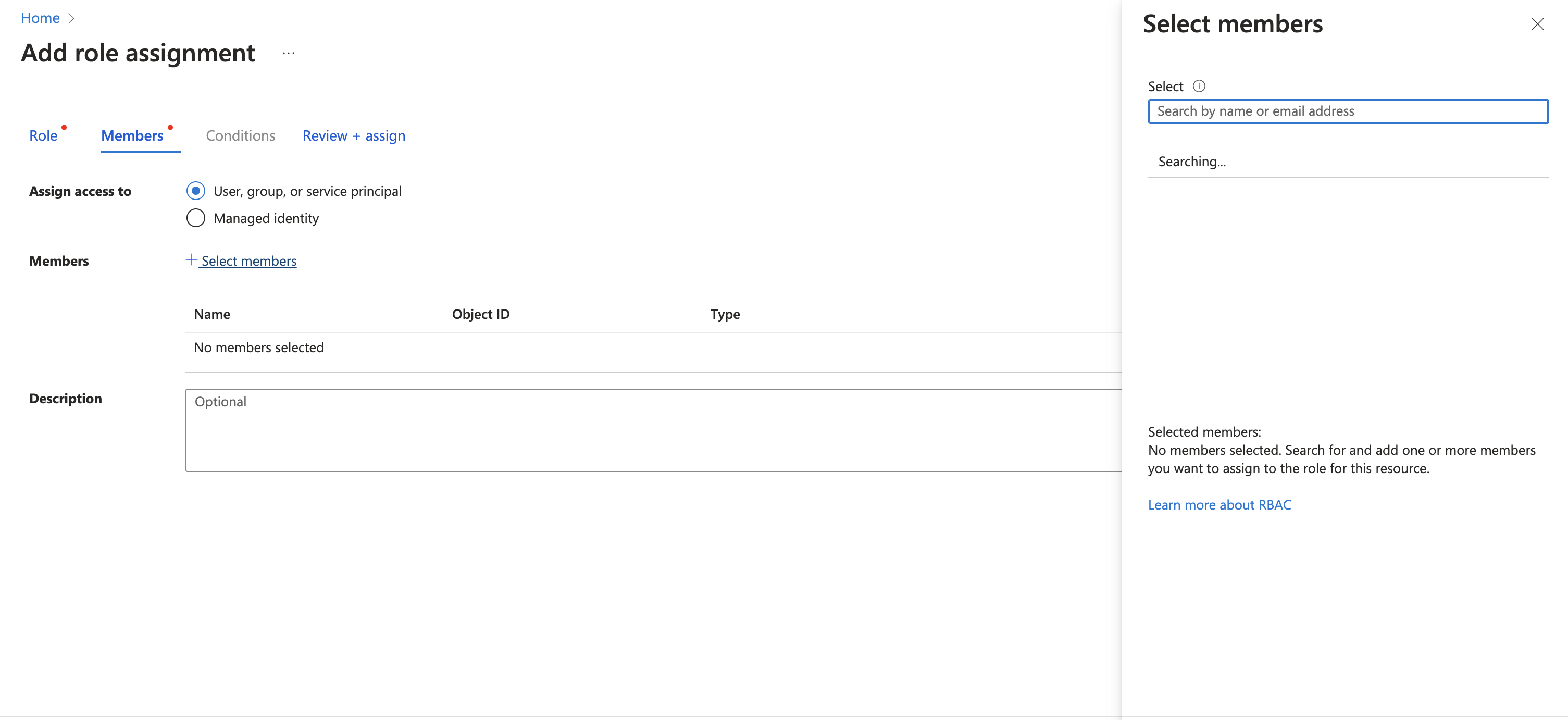
Assigning Roles
To create secrets:
- Navigate to your Key Vault in the Azure portal.
- Go to "Access control (IAM)".
- Add a role assignment for "Key Vault Contributor" to the desired user or service principal.
To read secrets:
- Follow the same steps as above.
- Instead, assign the "Key Vault Secrets User" role.
2. Creating and Managing Secrets
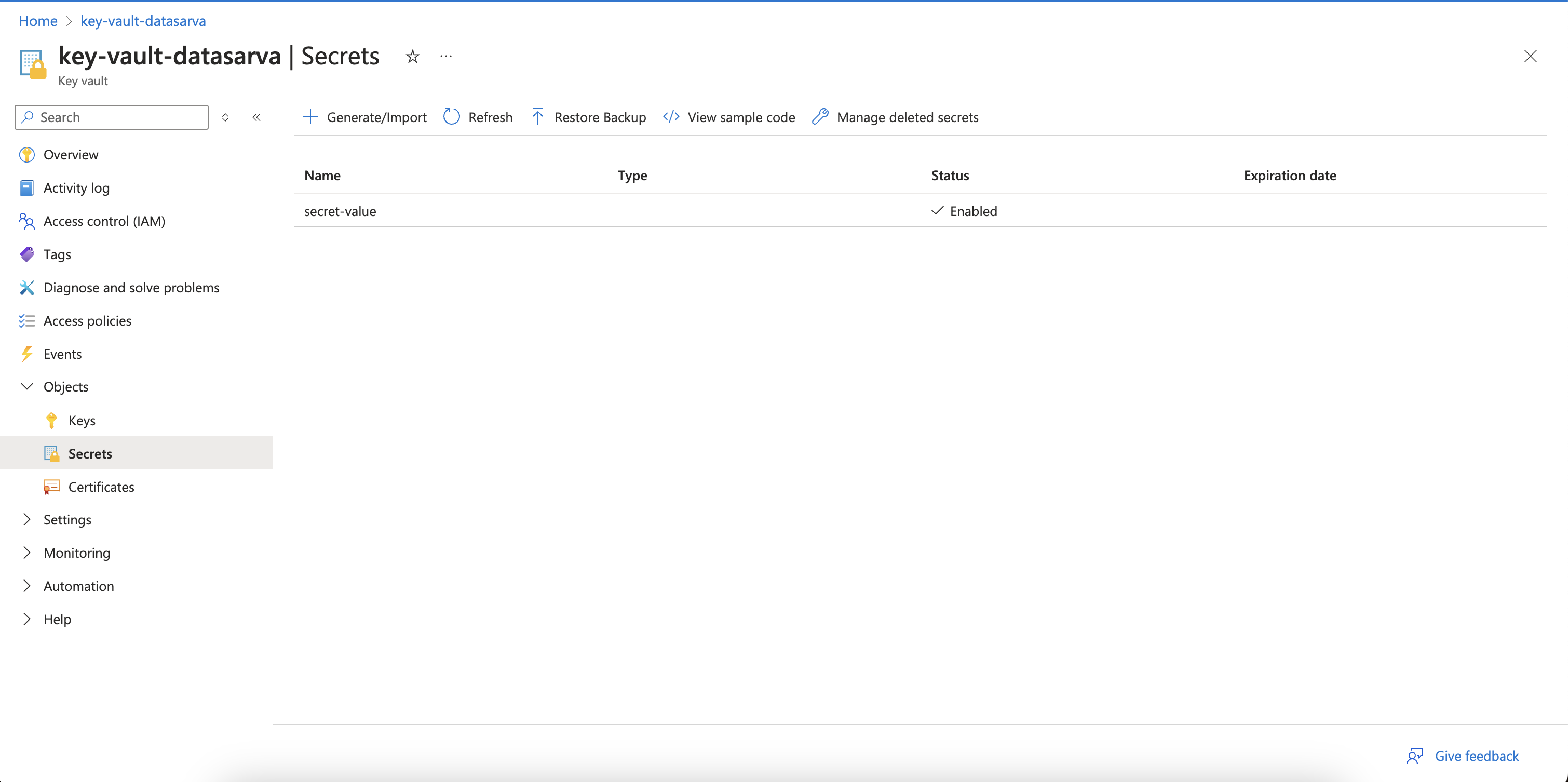
- Navigate to your key vault.
- Select Secrets from the left-hand menu.
- Click Generate/Import to create a new secret.
- Provide a name (e.g., secret-value) and value for the secret.
- Click Create.
3. Accessing Secrets in Microsoft Fabric Notebooks
Once you've set up your Key Vault and assigned the necessary roles, you can access secrets in your Microsoft Fabric notebook.
Retrieving Secrets
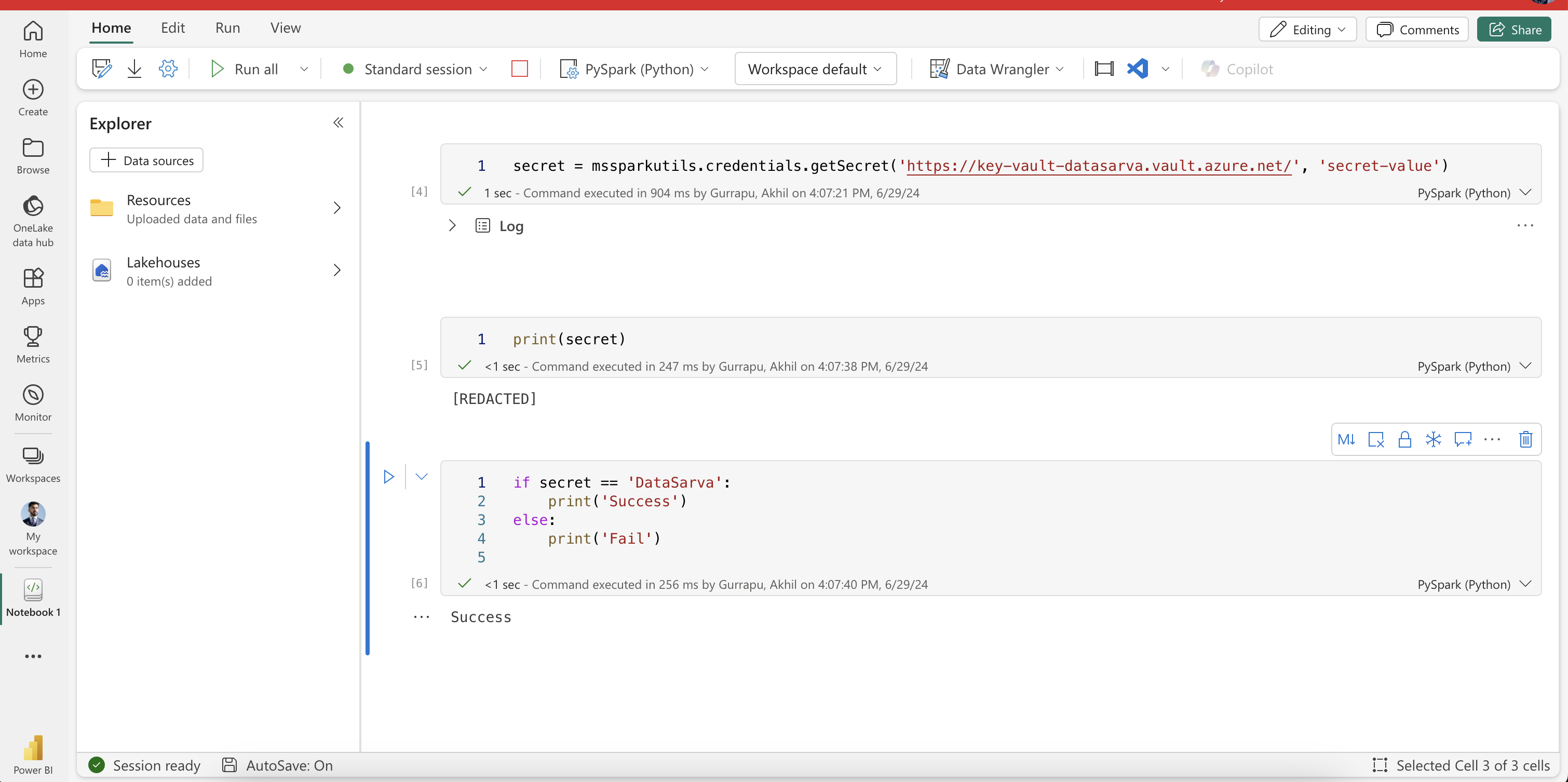
Microsoft Spark Utilities (MSSparkUtils) for Fabric is used to retrieve a secret within the notebook. MSSparkUtils is built-in so there is nothing that we need to import. Here is the Python code to retrieve a secret:
secret = mssparkutils.credentials.getSecret('https://key-vault-datasarva.vault.azure.net/', 'secret-value')Here, the getSecret method requires the following parameters:
- Key Vault URL: The URL of your key vault.
- Secret Name: The name of the secret you want to retrieve.
Replace the URL with your Key Vault URL and 'secret-value' with the name of your secret.
Verifying Secret Access
To verify that you've successfully retrieved the secret:
print(secret)This will output [REDACTED], ensuring that the actual secret value isn't displayed in the notebook, demonstrating Fabric's built-in protection against accidental secret exposure.
Validating the Secret
To check if the retrieved secret matches an expected value:
if secret == 'DataSarva':
    print('Success')
else:
    print('Fail')
If the secret matches 'DataSarva', this will output 'Success'.
Conclusion
By leveraging Azure Key Vault with Microsoft Fabric notebooks, you can securely manage and access secrets without exposing sensitive information. This approach enhances security by:
- Centralizing secret management in Azure Key Vault
- Using role-based access control for fine-grained permissions
- Preventing accidental exposure of secrets in notebooks
Remember to always follow best practices for secret management and regularly rotate your secrets to maintain a robust security posture.
On this page
Keep exploring
matched by tag + title overlap
Read next
Apache Spark for data ingestion into Microsoft Fabric Lakehouse using Notebooks
Explore the power of Apache Spark and Python for seamless data ingestion into Microsoft Fabric Lakehouse. Dive into Fabric notebooks, a scalable and systematic solution that empowers you to ingest external data, configure authentication…
#microsoft-fabric#data-analyst#data-engineeringData Factory Pipelines in Microsoft Fabric
EExplore the power of data pipelines in Microsoft Fabric. Learn how these pipelines streamline data transfer and transformation, using activities, parameters, and runs for efficient data management. Discover a code-minimal approach to…
#microsoft-fabric#data-analyst#data-engineeringData Integration in Microsoft Fabric Data Warehouse
Uncover the power of Microsoft Fabric Data Warehouse. Learn its key features, ETL process, and data loading strategies. Explore data pipelines, advanced SQL capabilities, and Dataflow Gen2. Get hands-on with workspace setup, lakehouse…
#microsoft-fabric#data-analyst#data-engineeringData Warehouses in Microsoft Fabric
Explore the power of Microsoft Fabric's data warehouse, designed for seamless collaboration among data professionals. Learn data ingestion, storage, querying, modeling, and visualization essentials. Create your own Fabric data warehouse…
#microsoft-fabric#data-analyst#data-engineering